

Most families who run out of money building a new home don't run out because the builder's price was wrong. They run out because the builder's price was never the whole cost. In 26 years of building I've watched good people reach handover with nothing left for a driveway, blinds or a fence, and it was almost always avoidable.
C24 Build Cost Plan is the checklist I use to stop that happening. It goes with the money chapters of The Home Owner's Guide to Building Without Regret.
What it is
C24 is a cost plan for your whole build, not just the house. It lists 55 cost lines in eight sections: the land, the costs before the contract, the contract itself, the allowances, the items builders often leave out, moving in, your contingency, and the money you have to pay for it all. The last page gives you one answer: a surplus or a shortfall.
It comes in two versions:
- PDF + Excel (A$59.95): a fillable PDF that adds itself up in Adobe Acrobat Reader, and an Excel workbook with the same formulas, plus a step-by-step filling it in guide with a worked example, Build Money Explained, Part 1: Before you sign, and its own questions and answers.
- Toolkit (A$119.95): everything above, plus the C24 Scenario Tool, a how-to guide, a Toolkit workbook and nine worked examples. The tool runs in your web browser, on your own computer, and your figures never leave it.
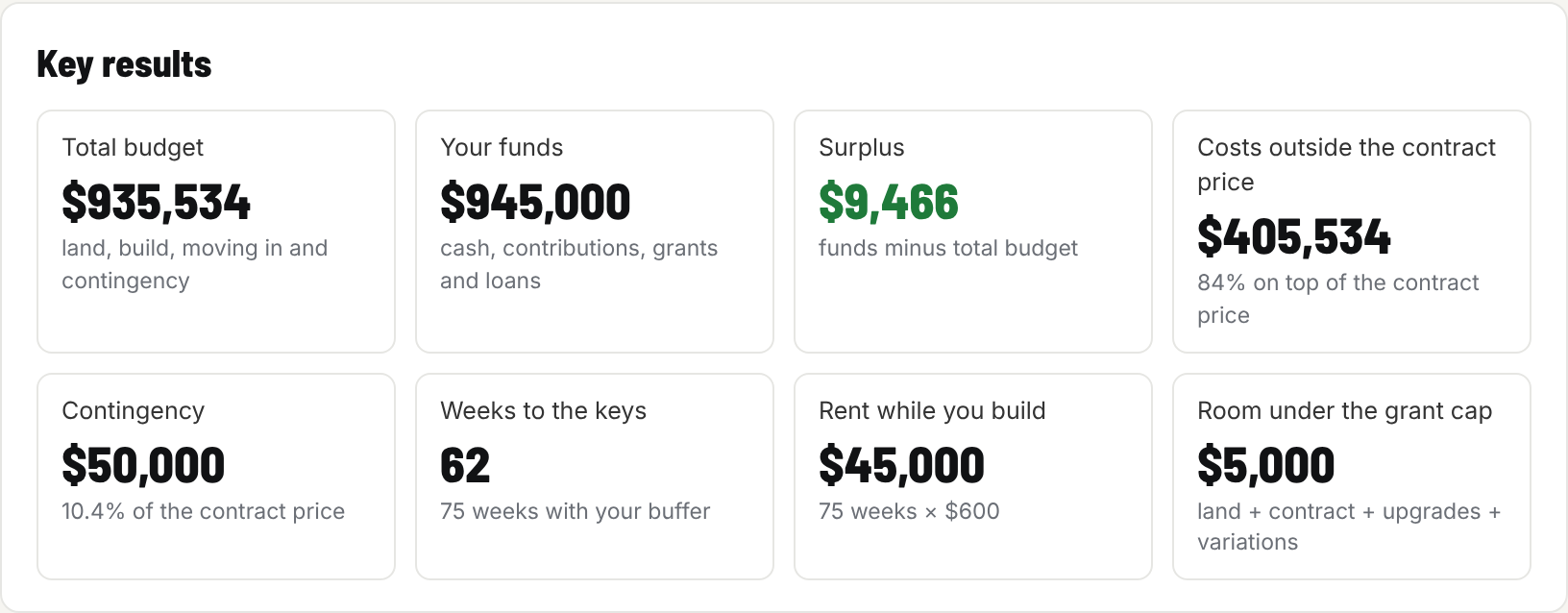
The Toolkit's key results for the $480k worked example: the whole budget, your money, and the surplus.
What it does
C24 adds up everything the builder's quote doesn't cover, and tells you in plain words whether you are likely to need each item and where the book explains it. Many lines give a Brisbane 2026 price range as a starting point.
A few things it does that a simple budget doesn't:
- In, Out or allowance on every line. You tick whether each item is in the contract, outside it, or only an allowance. Anything outside goes into your budget.
- An allowance check. For every PC item and provisional sum, you write the builder's allowance and your own estimate. C24 works out the likely overrun, including the builder's margin, and carries it into your budget.
- Helpers for the awkward lines. Weeks of rent, metres of fence, windows of blinds: enter the quantity and rate and the line fills itself in.
- A contingency that suits your risk, based on the block, the design and how fixed the price really is.
The Toolkit goes further. It shows your cash month by month, which costs move your budget most, and your best and worst case. It lets you choose how you are borrowing (a standard loan, a loan with LMI, the 5% Deposit Scheme and others) and checks it against your figures. It flags anything that looks wrong, keeps a register of every assumed figure so you can confirm it, and builds a PDF report for your broker or partner.
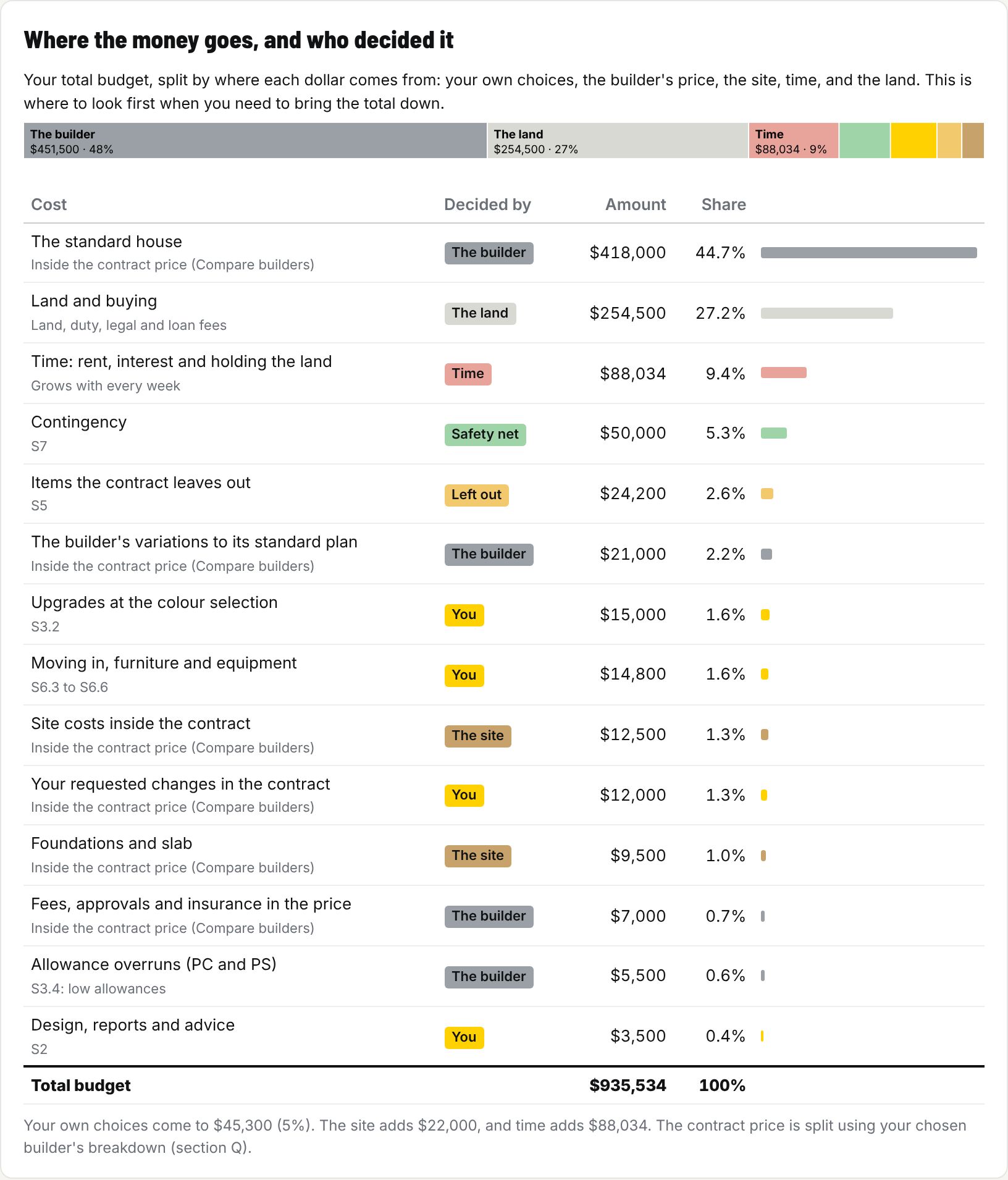
Where the money goes, and who decided it. Your own choices, the builder's price, the site and time are shown separately.
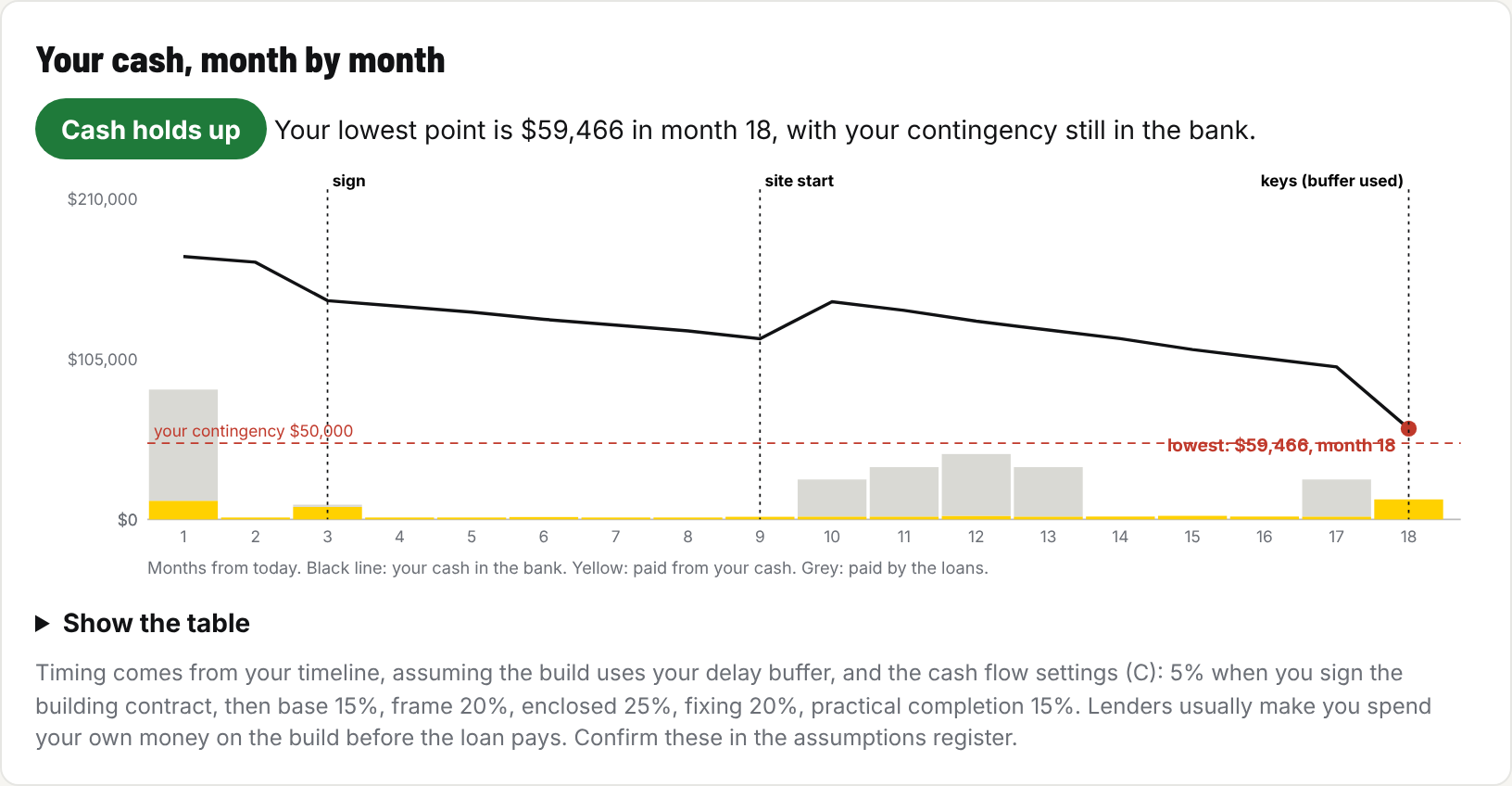
Your cash, month by month. The tool shows your lowest point and whether your contingency is still in the bank.
Who it's for
C24 is for anyone building a new home to live in:
- first home buyers working out what they can really afford;
- families choosing between a house-and-land package and a knock-down rebuild;
- anyone comparing quotes from two or three builders;
- people building on a sloping or tricky block, where the site costs can surprise you.
If you are building to sell, you want C26 Development Feasibility instead.
When to use it
Start C24 when you start looking at land or talking to builders, and keep it up to date until the day you sign the building contract. Update it every time you get a better number: a quote, a soil test, a lender's letter.
On the day you sign, its totals become the opening figures in C25 Build Money Ledger, which carries you from signing to the keys.
Why you would use it
Because before you sign is the only time you can still change things cheaply. If C24 says you are short, you can change the design, the inclusions, the block or the builder. After you sign, your options shrink to cutting the landscaping or borrowing more.
It also makes comparing builders fair. A low standard price with large variations, site costs and allowances inside it is where money hides. The Toolkit's Compare builders card puts up to three quotes on the same footing, so you compare the whole cost, not the headline price.
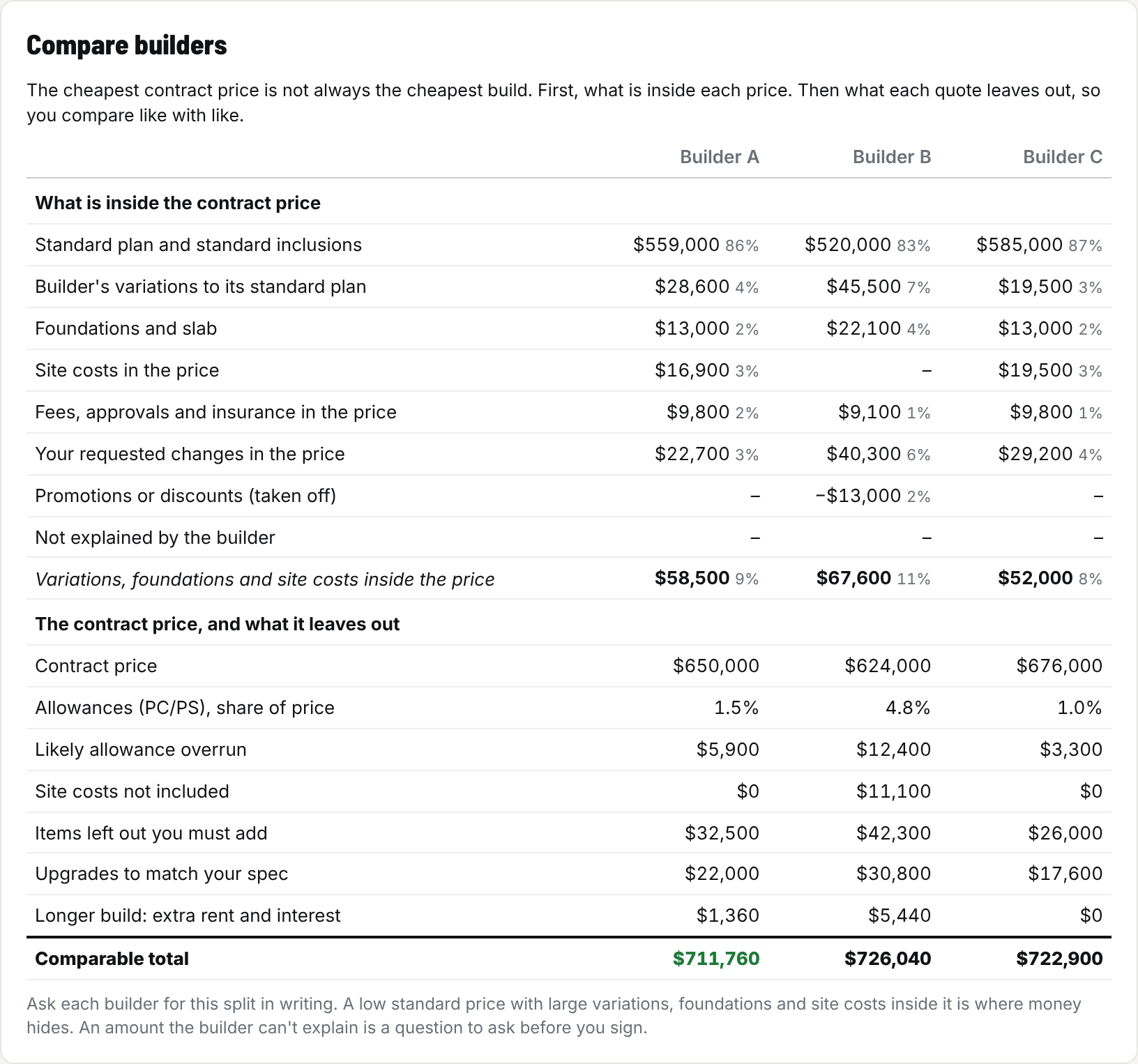
Compare builders, from the $650k worked example. Builder B has the lowest contract price but not the lowest whole cost.
How it helps you
- You go into the contract knowing the whole cost, with a contingency that is really there.
- You know which allowances are likely to run over before the builder tells you.
- You can show your broker one clear page, or a full report, instead of a pile of quotes.
- You can try "what if" before it happens: a longer build, dearer rent, a price rise, rock under the slab.
Nine worked examples come with the Toolkit, from a $350,000 single storey home to a $1.4 million architect design, four of them comparing three builders. Load the one closest to your build and use it as a guide while you fill in your own.
Which version suits you?
Both versions do the same sums with the same 55 lines, so the answer is the same either way. The difference is how much of the work it does for you.
| PDF + Excel (A$59.95) | Toolkit (A$119.95) | |
|---|---|---|
| Best for | Filling in by hand or in a spreadsheet | Testing options and comparing builders quickly |
| Adds itself up | Yes, in Adobe Acrobat Reader or Excel | Yes, as you type |
| Filling it in guide with a worked example | Yes | Yes, plus a how-to guide for the tool |
| Build Money Explained, Part 1 | Yes | Yes |
| Cash month by month, charts | No | Yes |
| Compare up to three builders side by side | No | Yes |
| "What if" tests and a report for your broker | No | Yes |
| Worked examples to load | One, in the guide | Nine |
Start with the PDF + Excel if you want to keep it simple. If you later want the charts and builder comparisons, you can upgrade to the Toolkit within 12 months for the difference in price (A$60). Planning and tracking the whole build? C24 and C25 together cost A$99.95 for both PDF + Excel versions, or A$203.95 for both Toolkits.
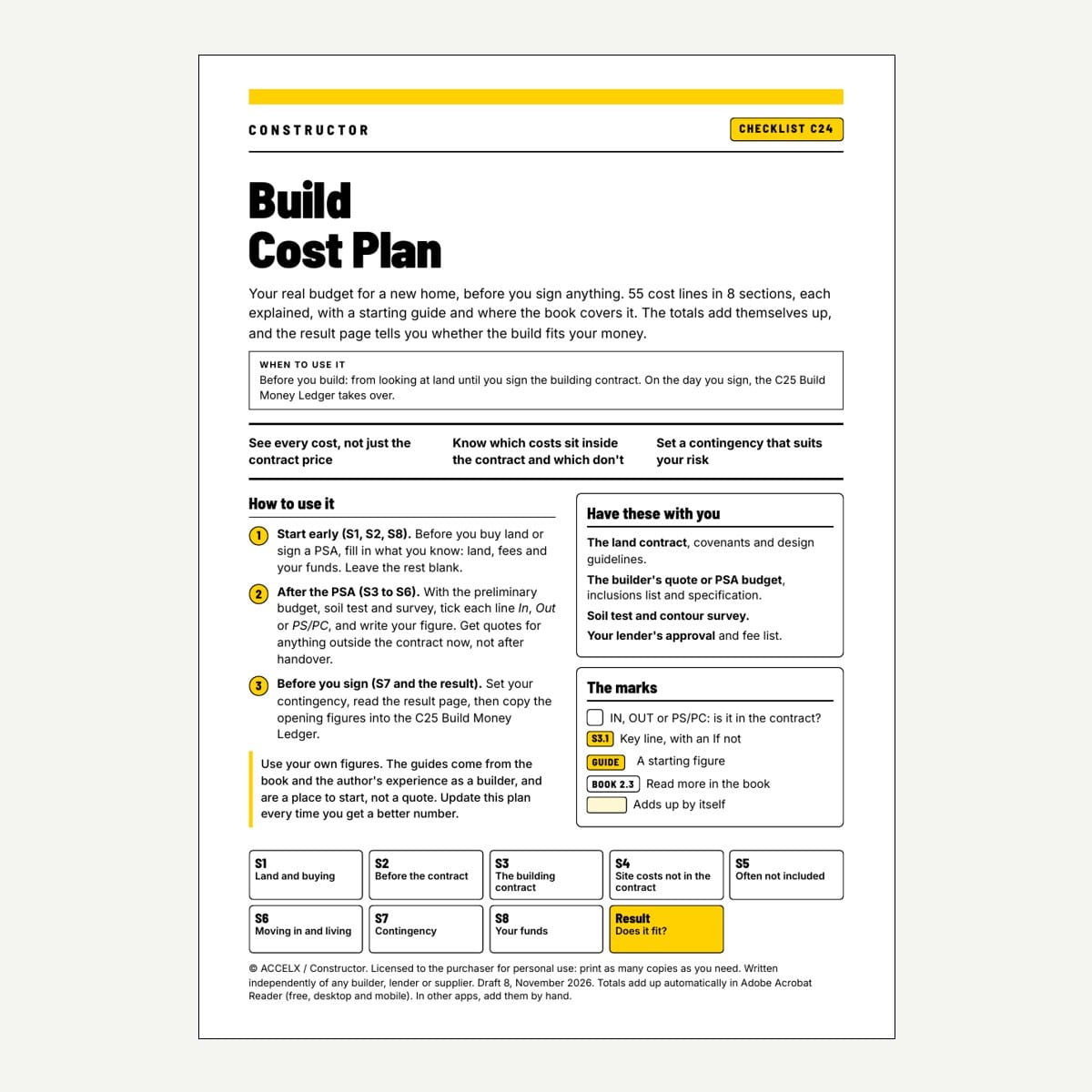
C24 - Build Cost Plan (PDF + Excel)
$59.95 AUD
Form factor: Fillable PDF + Excel workbook, Filling it in guide, Build Money Explained Part 1, questions and answers
When to use: Before you sign: from buying land to signing the contract
The whole cost of your build on one plan: 55 lines in eight sections, adding up to a surplus or a shortfall.
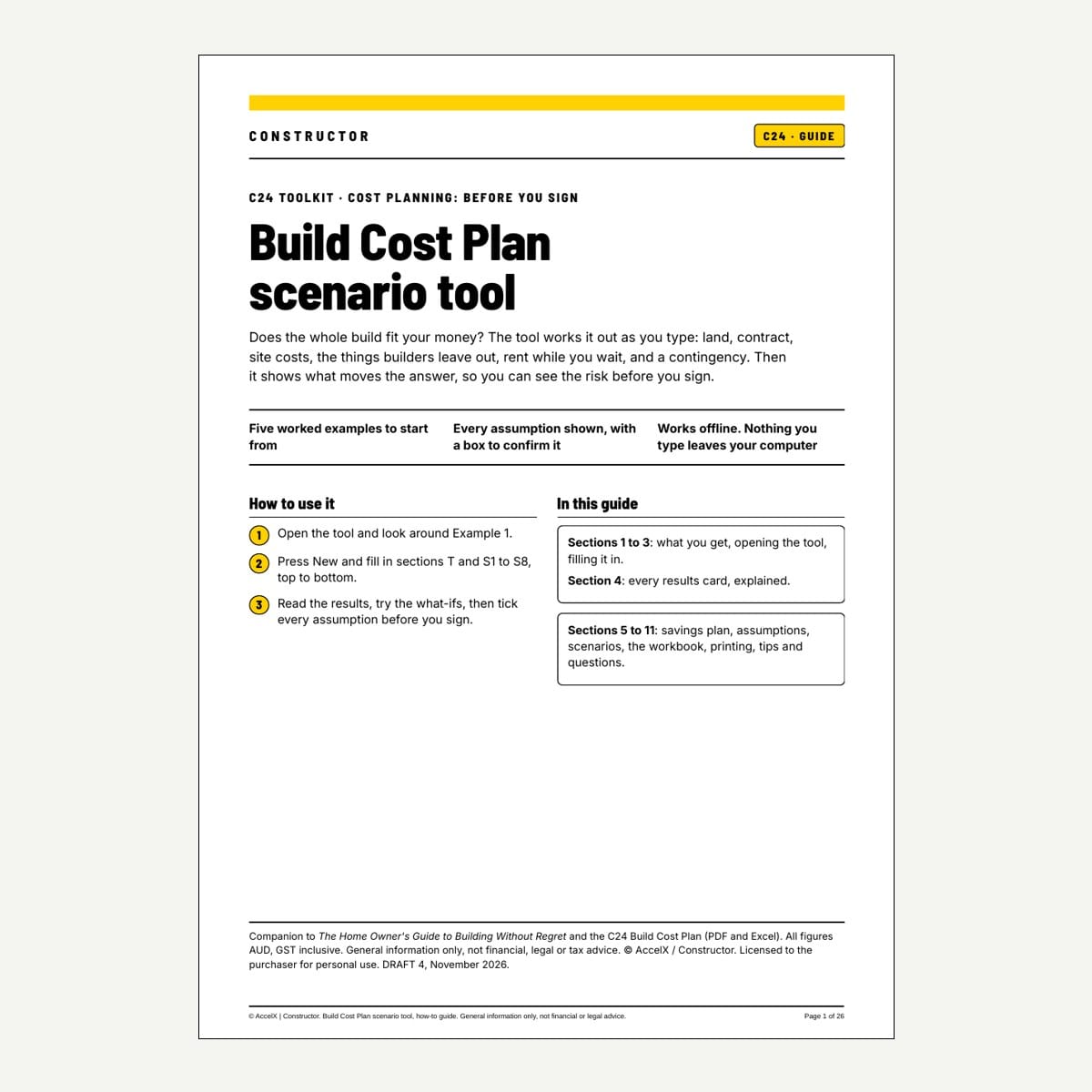
C24 - Build Cost Plan Toolkit
$119.95 AUD
Form factor: Browser app (offline, private) + how-to guide, Toolkit workbook, fillable PDF, nine examples, licence key for 3 devices
When to use: Before you sign, when you want to test options and compare builders
Everything in the PDF + Excel version, plus cash month by month, three builders side by side, "what if" tests and a report for your broker.
C24 is general information, not financial or legal advice. Use your own figures, check them with your broker or lender, and have a lawyer look at your contract before you sign.


